
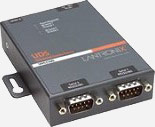
 The LANTRONIX UDS2100 is an intelligent Dual Serial-to-Ethernet device server that enables any device or machine with a serial port to become network and Internet-enabled within minutes. Using a method called Serial Tunneling you can manage your equipment from virtually anywhere over a network or the Internet. The UDS2100 device server has an integrated web server, allowing any device to which it is attached to be "contacted" and monitored via a standard Internet browser. TCP/IP is embedded into the UDS2100, enabling it to operate within non-PC environments. The Modem Emulation Mode allows it to behave like a modem but communicate over TCP/IP. The UDS2100 is a product which can be integrated into a system with minimal set-up. The configuration utility allows quick and easy customization to suit any network or serial device. Virtual Comm Port drivers are provided to allow a UDS2100-connected device to communicate with existing software over TCP/IP.
This video shows how to configure the Lantronics© UDS2100 Ethernet to serial port converter, allowing long-distance connectivity from any PC to Bosch conference equipment.
Install and start the Lantronix device installer, it will search automatically at first time use.
• Select the UDS2100 from the list.
• Select "assign IP" and enter the dessired IP address.
• Open the same address in IE.
• Select "channel 1 > serial settings"
• Set speed to 115.200 for DCN-CCU.
• Select "apply settings" to reboot the unit.
Install the Lantronics COM port redirector.
• Start the Lantronics CPR manager from the start menu
• Press add\remove and add 1 or 2 new COM ports.
• Select the first available COM port.
• Type the IP address into service slot 1, repeat for Com (n+1) and press "save".
• Bosch LBB4190 software, DDTK tool and open-interface tool packages are limited to COM 1 to 4.
Open windows device manager:
• Start > control panel > system > hardware > device manager
• Select "Ports" then "Lantronics CPR port (COM#)" then doubleclick.
• Select "port settings" then "advanced" then "COM port number".
• Change COM port to COM 1, 2, 3 or 4. Accept when asked to overwrite.
• Close all windows.
